
Occasionally you or someone in your office will have edited or added invoiceable activities in CARES after you generated a draft invoice and before you attempted to submit it. When this happens, CARES will display the expanded message below when you click the invoice's Submit Invoice to OCR button. (You will not see the message normally if there are no updated activities for that date range in CARES.)
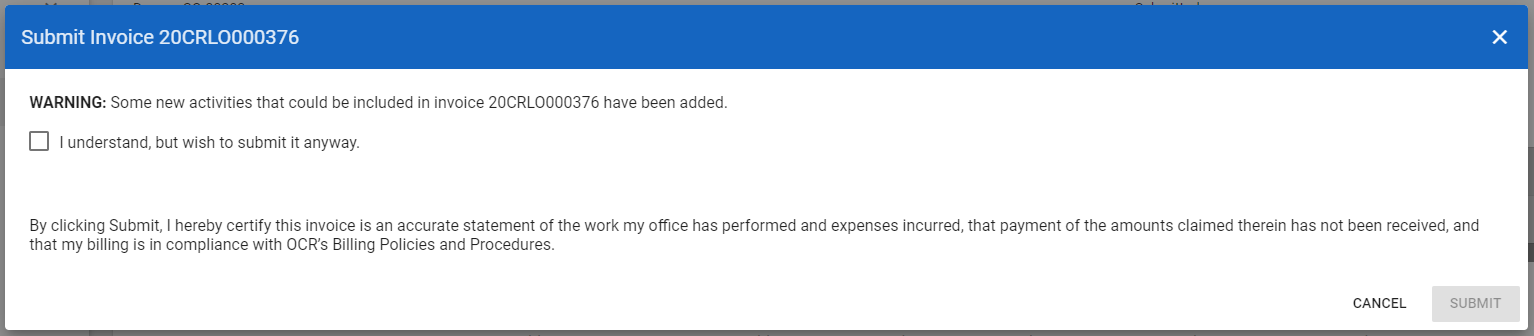
"Warning: Some new activities that could be included in your invoice have been added."
This is simply a courtesy notice that updated activities now exist which may be included for payment if you take action before proceeding. If you see this message, you have two choices:
- To update the contents of your invoice before submitting it (recommended--this typically means you will be paid for more activities), click Cancel to return to your invoice before submitting it. Then, on your draft invoice, click "Recreate Invoice" (pictured below). Doing so updates the contents of your invoice to the latest CARES entries instead of only those that existed when you initially generated the draft. After doing so, submit your invoice as usual.

- Or, to submit your invoice without updating its contents, such as if you do not have time to review an updated invoice, click the checkbox beside "I understand but want to submit it anyway." This verifies that you understand there may be activities that were just added to CARES for which you are opting not to bill OCR because they did not exist when you drafted your invoice. Checking this checkbox will enable the blue Submit button. Click it to submit your invoice as-is.